MobileApp: Mobile shop billing and EMI management software
MobileApp makes GST bills, sells phones on EMI and keeps every phone in stock by its IMEI. EMI reminders go out on WhatsApp. Works in the browser, in English and Gujarati.
30 days free, no card needed. Then ₹4,999 per year · ₹11,999 per year (incl. GST).
Details checked

What is MobileApp?
MobileApp is billing and EMI software for mobile phone shops. At the counter you scan the barcode or IMEI, choose cash, credit, EMI or a finance company, and print an A4 or thermal bill or share it on WhatsApp. EMI sales get a schedule with interest, reference persons and KYC. Every morning the app lists the EMIs due today and late, and staff send a WhatsApp reminder or collect the money in one tap. Stock is kept by IMEI across branches, with purchases, supplier dues, labels and stock checks. Repairs, old phone buy-back, warranty, staff pay and GSTR-1 files for the accountant are in the same app.
Who is MobileApp for?
Mobile phone shops that sell phones and accessories on cash, credit (udhaar) and EMI, from a single counter to a few branches. The owner, counter staff and the EMI collector each use it on their own phone or computer.
What problem does MobileApp solve?
EMI dues are kept in a notebook, so late payers are missed and calling every customer takes hours. Nobody knows which IMEI is in stock or who bought it. GST bills, credit and supplier dues are spread over paper, Excel and WhatsApp.
Key features of MobileApp
- GST bills for cash, credit (udhaar) and EMI sales: scan the barcode or IMEI, print A4, A5 or thermal 58/80 mm bills, or share the bill on WhatsApp
- EMI sales with flat or reducing interest, down payment, processing fee, late fee, reference persons, KYC and early loan closure
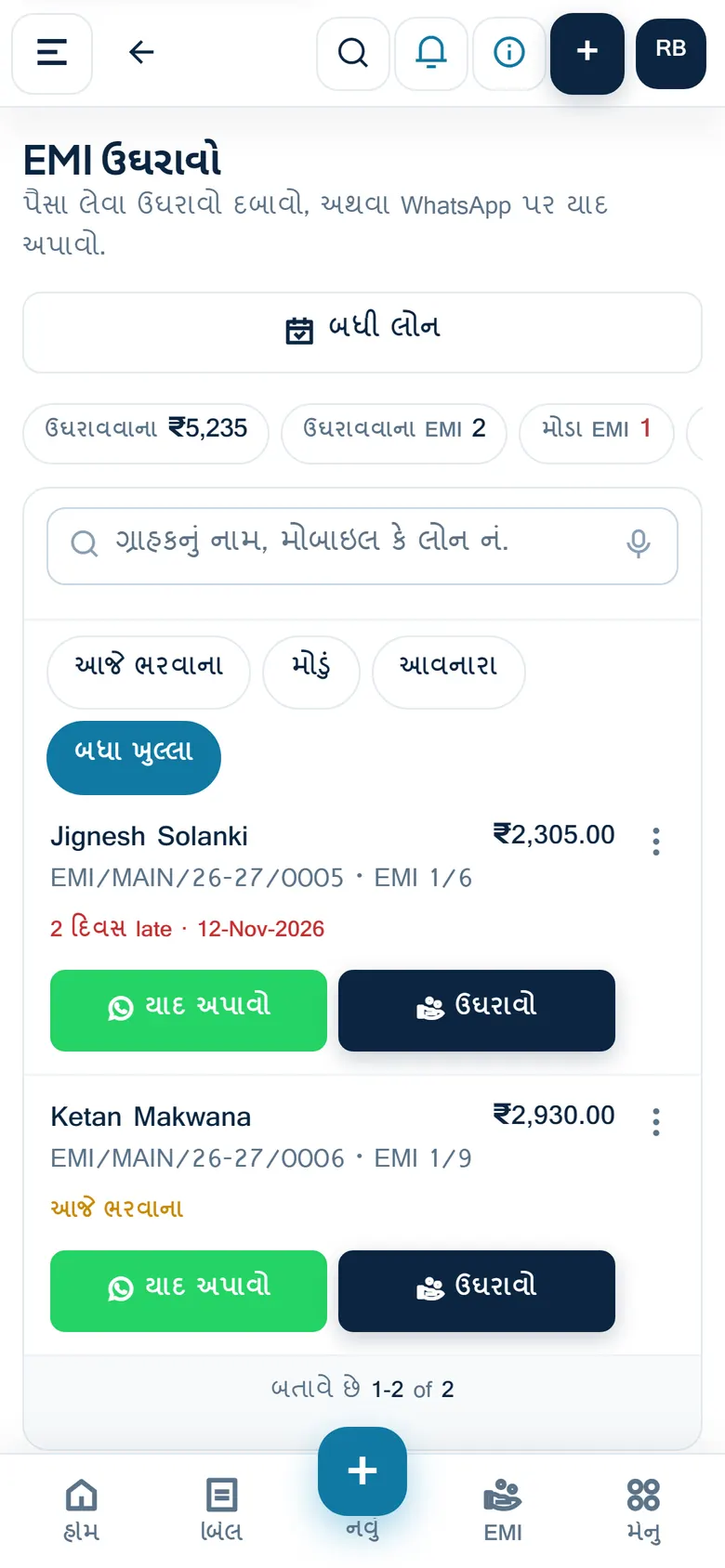
- Collect EMI screen with today's and late EMIs, one-tap WhatsApp reminders in English or Gujarati, and collection routes by area for the collector
- Stock by IMEI: purchases by quantity, IMEI history, stock per branch, branch transfers, stock check by scanning, barcode and QR labels
- Customer account link and shared bill with a UPI QR code for the amount due
- Repairs with job cards, old phone buy-back or exchange on a new bill, warranty check by IMEI, and protection plans
- Quotations, purchase orders with a reorder list, advance booking with token money, coupons, gift vouchers and loyalty points (switched on by the owner)
- Finance company sales (DO number, money due from the company), brand schemes, other income, shop expenses and day-end cash closing
- 40+ reports, an AI report you ask for in plain words, smart insights from your own data, GSTR-1 JSON and Excel, and a GSTR-3B summary for your accountant
- Owner and staff logins with roles, branches, an audit log, and alerts to the owner for big discounts, cancelled bills and EMI collections
Why businesses use MobileApp
- The owner sees today's sales, money received and late EMIs on one screen, from the phone.
- EMI reminders go out on WhatsApp in a tap instead of phoning each customer.
- Every phone sold can be traced by its IMEI to the bill and the customer.
- The accountant gets GSTR-1 files and reports without retyping bills.
- Staff work under their own login, and the owner is told about discounts, cancelled bills and EMI collections.
See MobileApp in use.
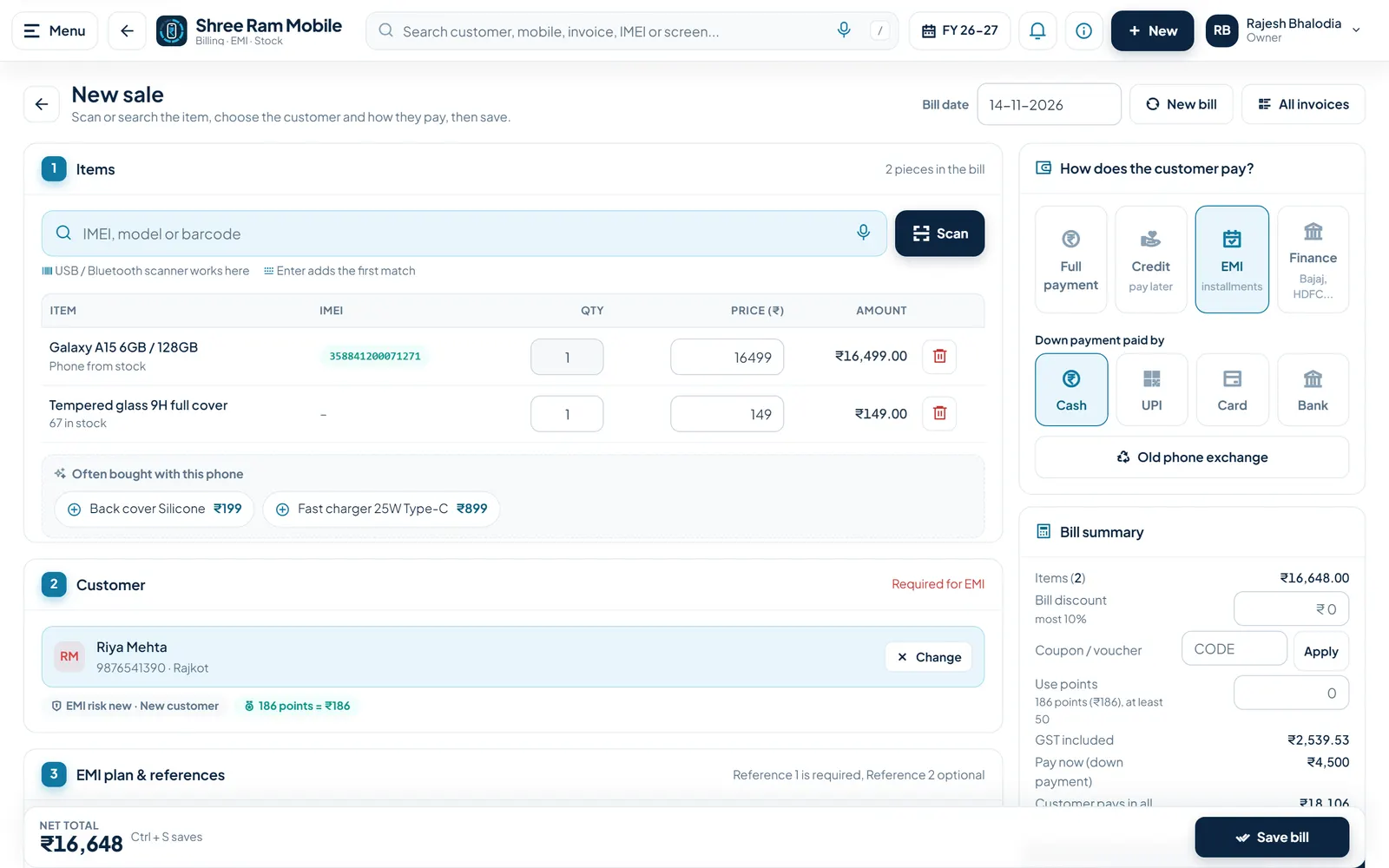
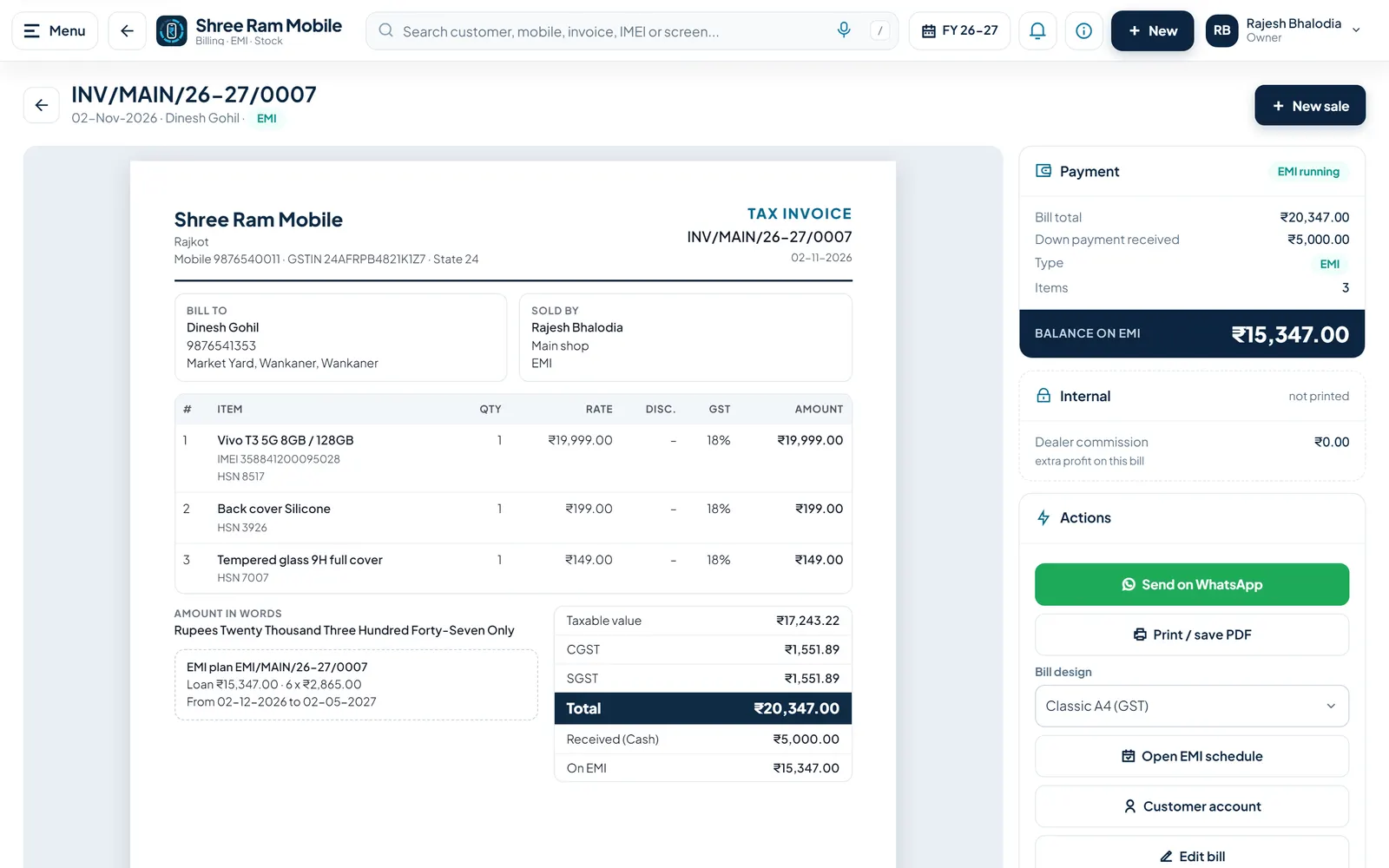
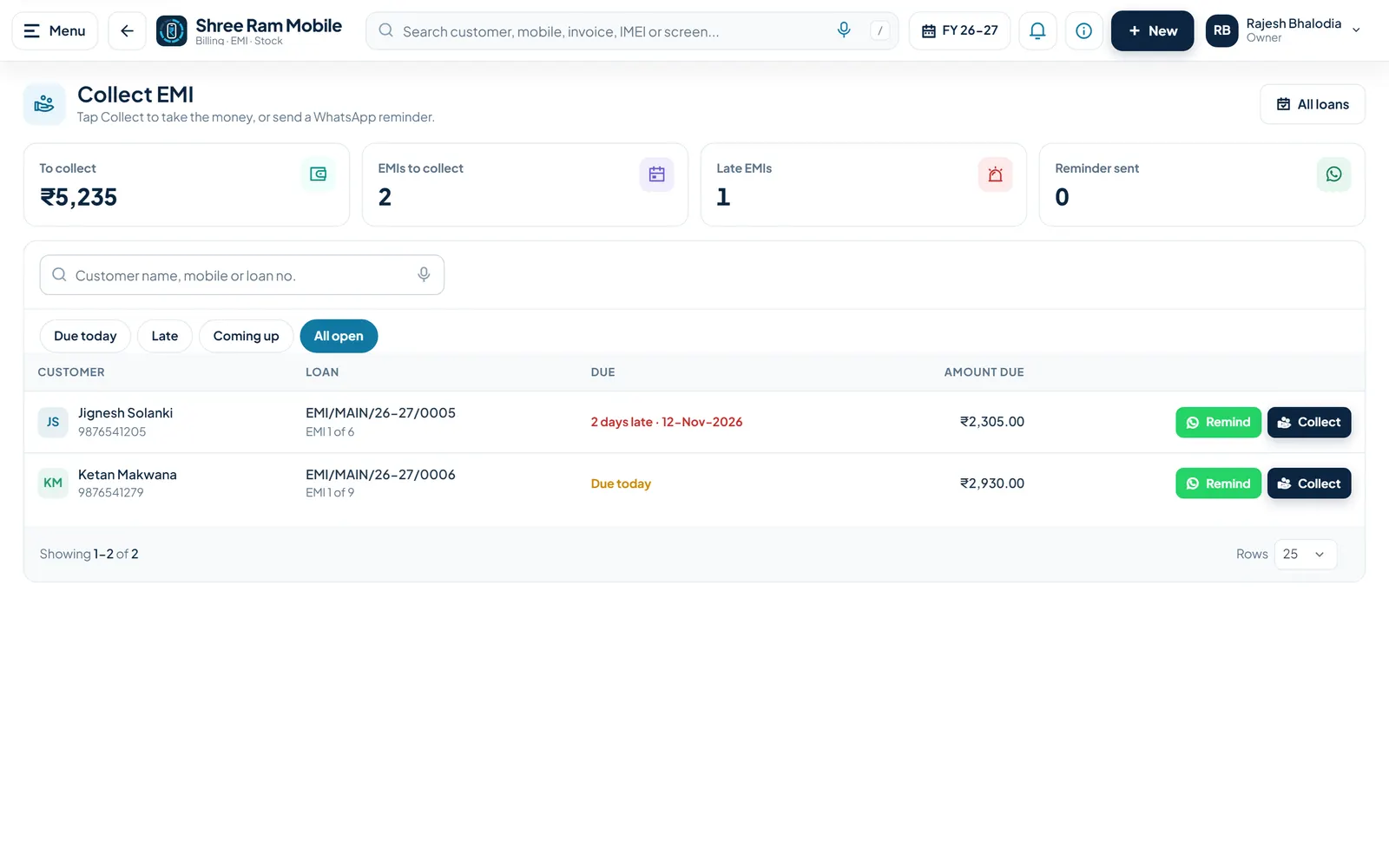
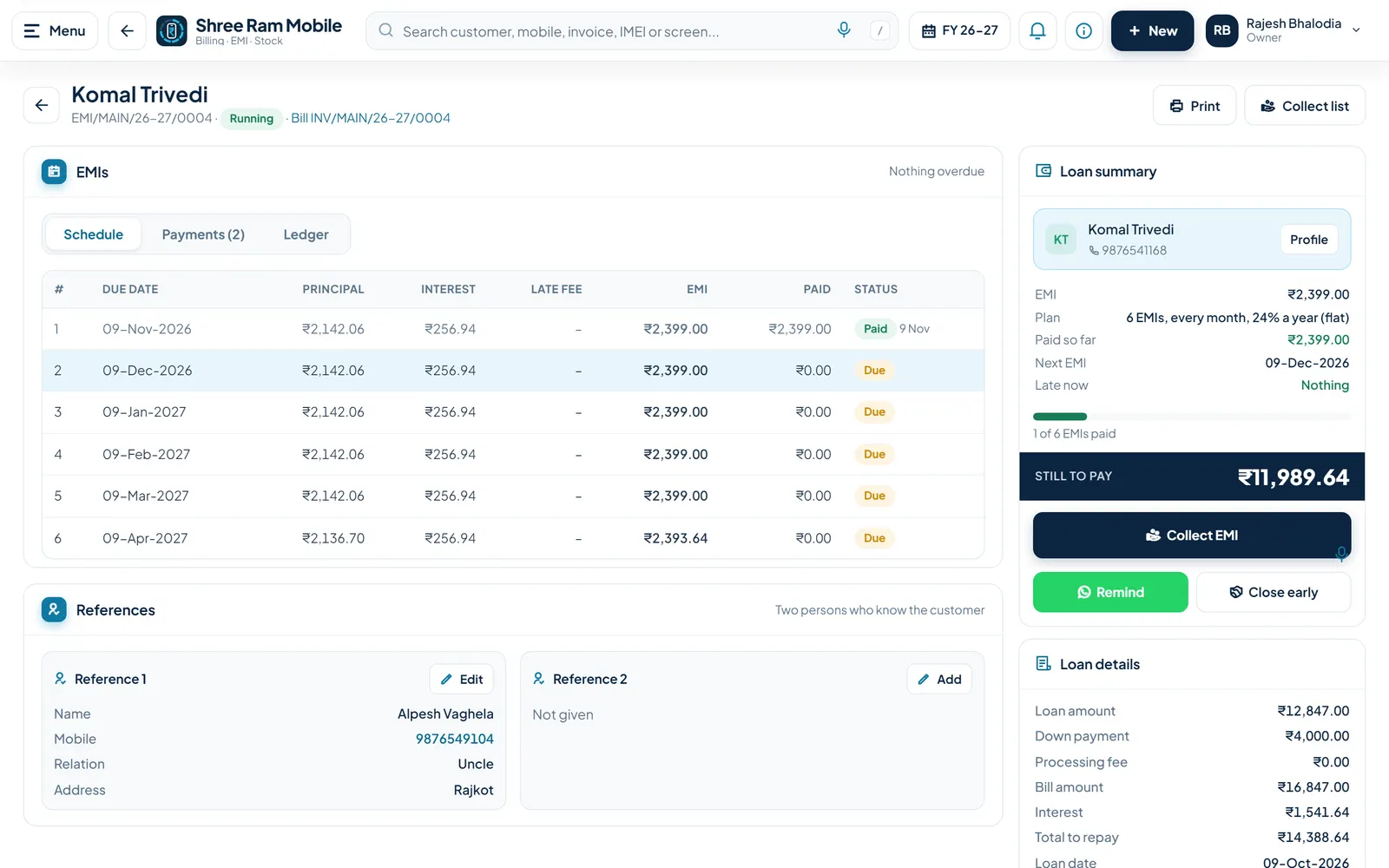
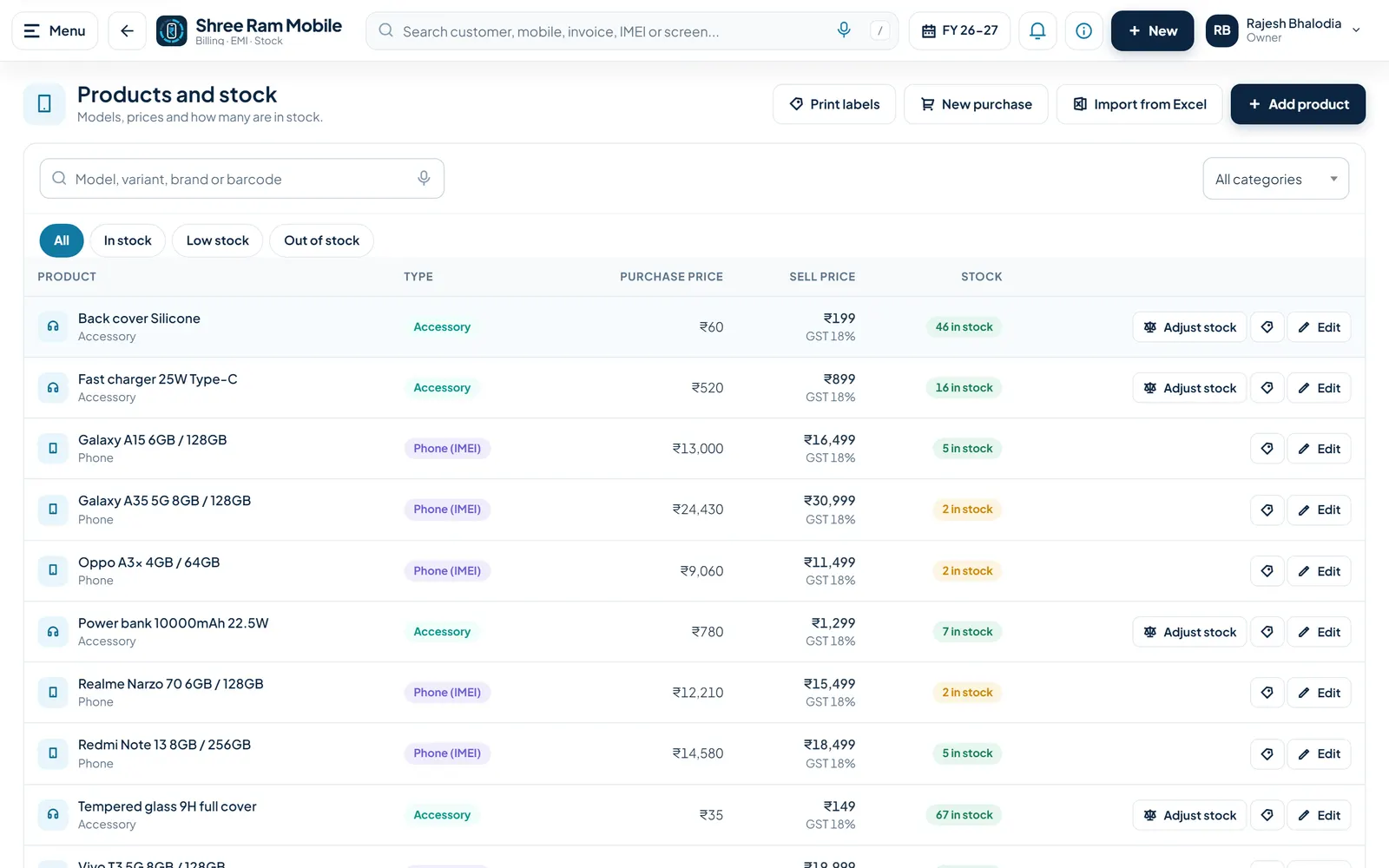
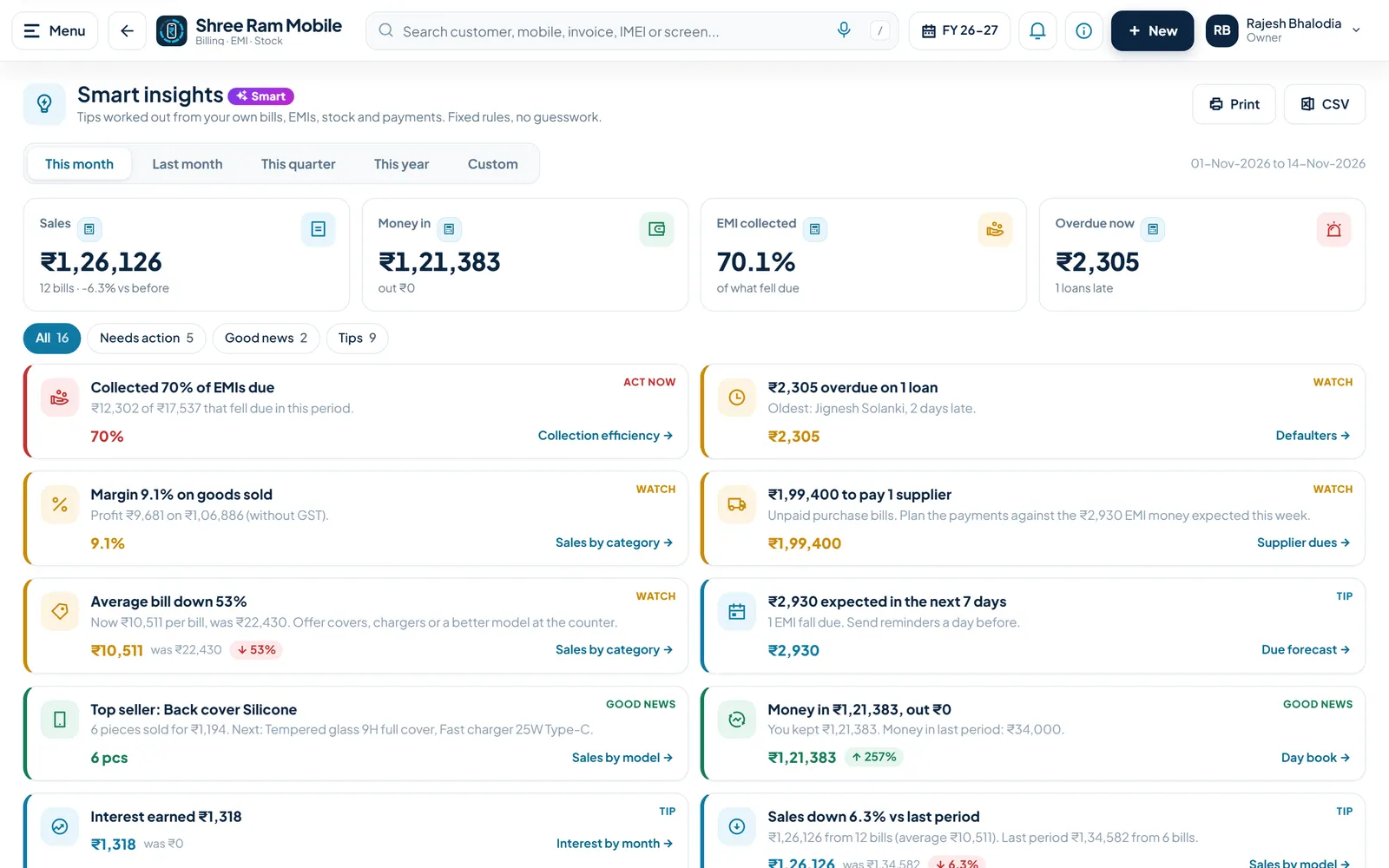
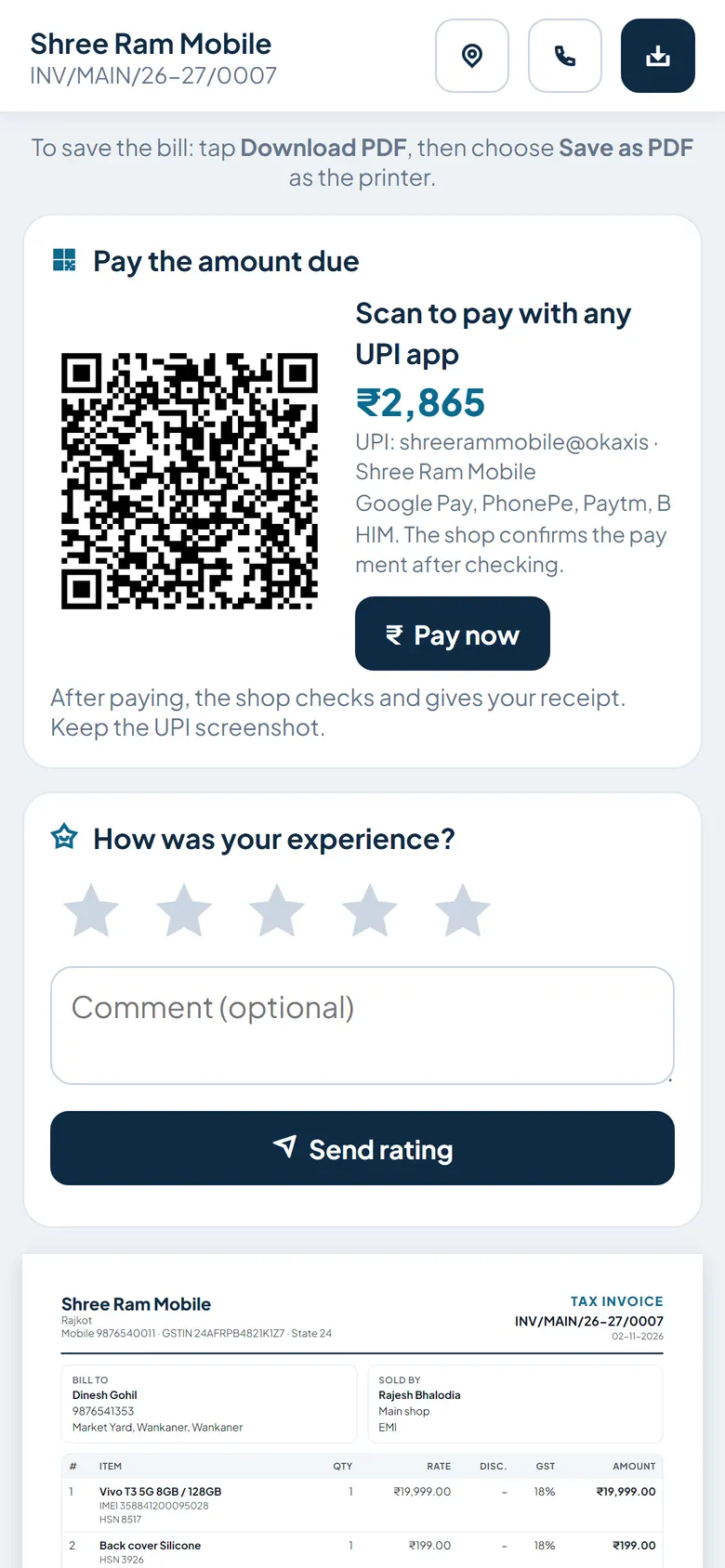
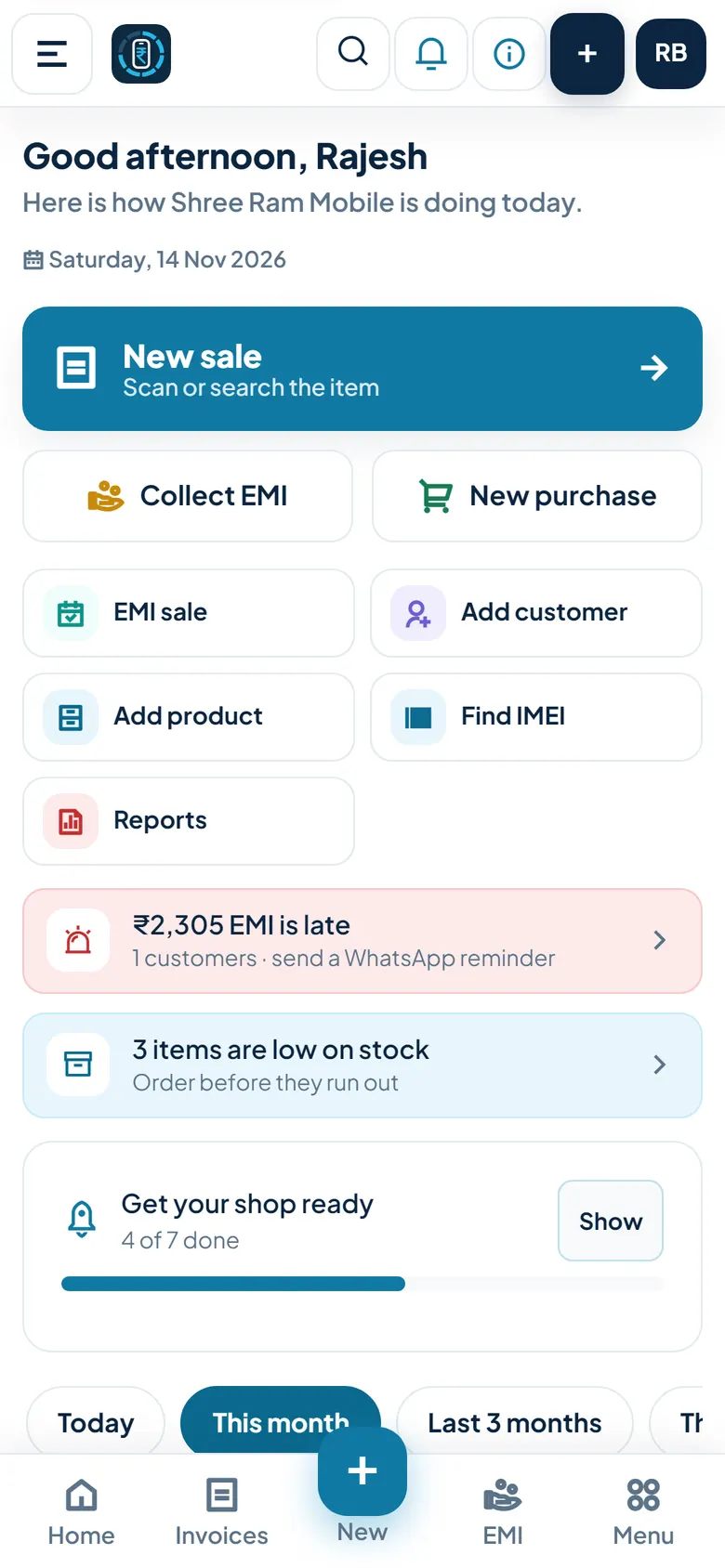
Screens show a demo business with sample data.
How do you start with MobileApp?
- Create your shop on the website with the shop name, your mobile number, a user name and a password. The free trial starts at once.
- Add products and stock: type them, scan IMEIs on a purchase bill, or import customers and products from Excel.
- Make bills at the counter: cash, credit or EMI, then print the bill or share it on WhatsApp.
- Each morning open Collect EMI or Today, send reminders and take EMI payments.
- Add staff logins and see sales, dues and profit in reports.
How much does MobileApp cost?
- ₹0
- 1 branch
- Up to 3 users
- All features
- ₹4,999
- 1 branch
- Up to 5 users
- All features
- ₹11,999
- Up to 5 branches
- Up to 25 users
- All features
30 days free on sign-up, no card needed and no approval needed; the shop is ready at once. After the trial the shop chooses a plan to go on and the data stays as it is.
Where does MobileApp run?
- Runs on
- Web browser on phone or computer; can be added to the phone's home screen
- Without internet
- Partly: when the internet drops, cash and credit bills and EMI collections are saved on the phone and sent when the internet is back (shop rule 'Work without internet'). Everything else needs internet.
- You need
- A current browser (Chrome on Android, Safari on iPhone, or a computer browser) and an internet connection. A printer (A4 or thermal 58/80 mm) and a USB or Bluetooth barcode scanner are optional; the phone camera can scan barcodes and IMEIs.
- Users
- Owner plus staff logins with roles (owner, manager, cashier, collector, viewer). Basic plan: up to 5 users and 1 branch. Pro plan: up to 25 users and 5 branches.
What does MobileApp connect to?
- GSTR-1 JSON for the GST portal's offline tool, plus GSTR-1 Excel and a GSTR-3B summary
- WhatsApp messages and bill sharing through WhatsApp links (the user taps send; no WhatsApp Business API)
- UPI QR code and pay link with the amount due on bills and the customer account page
- Google Drive for customer documents, photos and nightly backups
- Excel import of customers and products, and Excel export of all shop data
- USB or Bluetooth barcode scanners and thermal receipt printers (58 and 80 mm)
How are you set up and supported?
- Getting started
- Sign up online. A 'Get your shop ready' checklist on the home screen walks through shop details, UPI ID, bill design, first product, first bill, first EMI sale and a staff user. Sample data can be added at sign-up to try the app and removed later.
- Bringing your data
- Customers and products can be imported from Excel, using a template with a preview and checks; existing records can be skipped or updated.
- Support
- Phone and WhatsApp +91 90162 26950, 11:00 to 18:00 IST. Email nikunjaghera@gmail.com.
- Training
- A help panel on every screen in English and Gujarati, opened with the (i) button or F1. User guides and a user manual are provided on request.
Is my data safe?
- Backups
- The database is backed up every day. A copy goes to Google Drive every night, and the last 14 backups are kept.
- Export
- The owner can download all shop data in one Excel file. Reports can be downloaded as CSV.
- Sign-in and staff access
- User name and password for every user; the account locks for 15 minutes after 5 wrong passwords. Staff roles and permissions, branch access, a sign-in log and an audit log of changes. The site runs on HTTPS.
- Hosting
- In India: database on DCode Software's web server; photos, documents and backups are kept in Google Drive.
What's new in MobileApp
- Quotations, purchase orders with a reorder list, loyalty points, coupons and gift vouchers, advance booking, protection plans, birthday and upgrade wishes, EMI risk grade, accessory suggestions on the bill, audit log screen and linking several shops.
- New public home page with Sign in, Create your shop, and call or WhatsApp contact.
- Repairs, old phone buy-back and exchange, warranty, finance company sales, brand schemes, staff pay, GSTR-1 and GSTR-3B help, WhatsApp reminder queue, collection routes, label printing, stock check, branch transfers, Gujarati screens and offline bills.
- Excel import of customers and products, sample data at sign-up, and shop data download in one Excel file.
Free tools and guides
- Free calculatorMobile phone EMI calculatorEMI calculator for mobile phone shops: price, down payment, months, flat or reducing interest and processing fee, with a month-by-month schedule.
- GuideHow Mobile Shops Track EMI Sales and CollectionsShop EMI vs finance company sales, flat vs reducing interest, a 6-month schedule with late and overdue EMIs, and how to check the finance payout.
Questions about MobileApp.
Do I need a computer?
No. MobileApp works in the browser on any smartphone and can be added to the home screen. A computer and printer are only needed if you want to print A4 bills; thermal printers also work.
Can I sell on EMI and track the installments?
Yes. An EMI sale makes a schedule with interest, down payment and reference persons. The Collect EMI screen shows the EMIs due today and late, with a WhatsApp reminder and a Collect button for each.
Does it keep stock by IMEI?
Yes. Phones are bought in with their IMEIs, chosen or scanned on the bill, and every IMEI can be searched to see its purchase, sale and customer.
Does it make GST bills and GST returns?
It makes GST bills with CGST and SGST and gives GSTR-1 as JSON for the GST portal's offline tool and as Excel, plus a GSTR-3B summary. Check the returns with your accountant before filing.
Can my staff use it?
Yes. Each person gets their own user name and password, and you choose what each role can see and do. The owner is told about big discounts, cancelled bills and EMI collections.
Can I use it in Gujarati?
Yes. Screens, help, bills and WhatsApp reminders can be in Gujarati or English.
Is my data safe?
Each shop sees only its own data. Users sign in with a password and the account locks after 5 wrong tries. The database is backed up every night to Google Drive, and the owner can download all shop data in Excel.
Can I bring my existing customers and products?
Yes. Customers and products can be imported from Excel with a template, a preview and checks.
How long is the free trial and what happens after?
The trial is 30 days, with no card needed. After it, choose a plan to go on; your data stays as it is.
How much does it cost?
Basic is ₹4,999 a year for 1 branch and up to 5 users. Pro is ₹11,999 a year for up to 5 branches and 25 users. Both include all features, and prices include GST.
I have more than one shop. Will it work?
You can add branches to one shop (the Pro plan allows up to 5), or link separate shops and see all their numbers on one screen.
Does MobileApp work on a mobile phone?
Yes. MobileApp runs in a web browser on a phone or computer and can be installed on a phone's home screen, so it opens like a regular app.
Who makes MobileApp?
MobileApp is built and run by DCode Software, a software studio in Rajkot, Gujarat, India, founded in 2014. It is one of DCode Software's 7 in-house products, each made for one kind of business.
Try MobileApp
30 days free on sign-up, no card needed and no approval needed; the shop is ready at once. After the trial the shop chooses a plan to go on and the data stays as it is. You get started with MobileApp on its own website, separately from our other products.
Need something custom?
If MobileApp is close to what you need but not quite, DCode Software also builds custom software, web platforms and mobile apps. Tell us about your business and we'll tell you whether we can help.
Other products from DCode Software
- GSTGST billing and accounting software
- MCalcBilling and stock software for marble, granite and tile traders
- Vastra DeskBilling software for clothing rent shops and clothing stores
- Milk SetuDairy & milk delivery management software
- Auto DealUsed car and bike dealer management software
- Smart BusSchool bus tracking and transport management software